Kafka Topics Management and Operations#
In our previous article, we successfully deployed a 3-node Kafka cluster on Kubernetes using KRaft mode. Now it’s time to dive deep into Kafka topics management and explore the essential operations every data engineer should master.
This comprehensive guide will cover everything from basic topic creation to advanced performance optimization, all with hands-on examples using our live Kafka cluster.
🎯 What We’ll Cover#
- Topic Creation & Configuration: Essential parameters and best practices
- Producer Operations: Sending data with different serialization methods
- Consumer Operations: Reading data and understanding consumer groups
- Serialization Methods: JSON, Avro, and Protobuf comparison
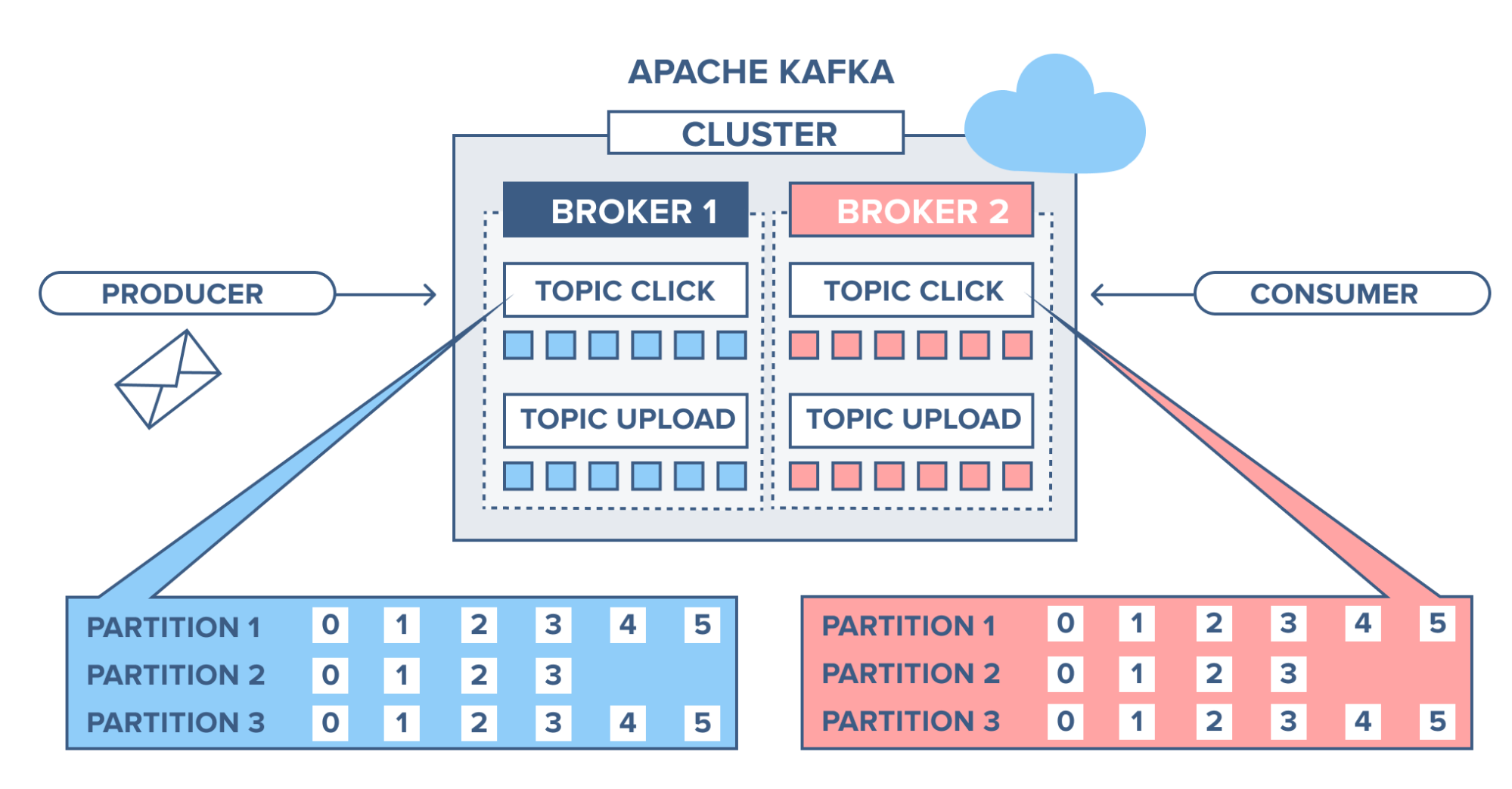
- Partitioning & Replication: Distribution strategies and fault tolerance
- Bulk Operations: Batch processing and performance optimization
- Advanced Configuration: Retention policies and performance tuning
- Message Ordering: Understanding ordering guarantees and challenges
Prerequisites:
- Running Kafka cluster (we’ll use the one from our previous deployment)
- Java 17 or higher installed and configured
- Kafka CLI tools (
kafka-console-producer,kafka-console-consumer, etc.) - Basic understanding of Kafka concepts
Important:
Kafka 4.0+ requires Java 17 or higher. If you encounter UnsupportedClassVersionError, check your Java version with java -version and upgrade if necessary.
🚀 Getting Started#
First, let’s verify our Kafka cluster is accessible and list any existing topics:
# Test connectivity to our Kafka cluster
kafka-topics --bootstrap-server localhost:19092,localhost:19093,localhost:19094 --list
# Empty output means no topics exist yet
Excellent! Our cluster is accessible and ready for operations.
📋 Topic Creation and Configuration#
Basic Topic Creation#
Let’s start by creating our first topic with essential parameters:
# Create a topic with 3 partitions and replication factor of 3
kafka-topics --bootstrap-server localhost:19092,localhost:19093,localhost:19094 \
  --create \
  --topic user-events \
  --partitions 3 \
  --replication-factor 3
Created topic user-events.
Understanding Key Parameters#
Let’s create topics with different configurations to understand each parameter:
# Topic for high-throughput data
kafka-topics --bootstrap-server localhost:19092,localhost:19093,localhost:19094 \
  --create \
  --topic high-throughput \
  --partitions 6 \
  --replication-factor 3 \
  --config retention.ms=86400000 \
  --config segment.ms=3600000
Created topic high-throughput.
# Topic for critical data with long retention
kafka-topics --bootstrap-server localhost:19092,localhost:19093,localhost:19094 \
  --create \
  --topic critical-events \
  --partitions 2 \
  --replication-factor 3 \
  --config retention.ms=604800000 \
  --config min.insync.replicas=2
Created topic critical-events.
Inspecting Topic Configuration#
# List all topics
kafka-topics --bootstrap-server localhost:19092,localhost:19093,localhost:19094 --list
critical-events
high-throughput
user-events
# Describe a topic in detail
kafka-topics --bootstrap-server localhost:19092,localhost:19093,localhost:19094 \
  --describe --topic user-events
Topic: user-events	TopicId: abc123def-4567-8901-234f-56789abcdef0	PartitionCount: 3	ReplicationFactor: 3	Configs:
	Topic: user-events	Partition: 0	Leader: 1	Replicas: 1,2,3	Isr: 1,2,3
	Topic: user-events	Partition: 1	Leader: 2	Replicas: 2,3,1	Isr: 2,3,1
	Topic: user-events	Partition: 2	Leader: 3	Replicas: 3,1,2	Isr: 3,1,2
Key Configuration Parameters:
- Partitions: Determines parallelism (hard to change later!)
- Replication Factor: Number of copies for fault tolerance
- retention.ms: How long messages are retained
- min.insync.replicas: Minimum replicas that must acknowledge writes
- segment.ms: Time before log segment rolls over
📤 Producer Operations#
Basic Message Production#
Let’s start producing messages to our topics:
# Start console producer for user-events topic
kafka-console-producer --bootstrap-server localhost:19092,localhost:19093,localhost:19094 \
  --topic user-events
Now we can type messages (each line is a separate message):
user123 logged in
user456 viewed product X
user789 added item to cart
user123 completed purchase
Press Ctrl+C to exit the producer.
Producer with Key-Value Pairs#
# Producer with keys (useful for partitioning)
kafka-console-producer --bootstrap-server localhost:19092,localhost:19093,localhost:19094 \
  --topic user-events \
  --property parse.key=true \
  --property key.separator=:
Example messages:
user123:{"action":"login","timestamp":"2024-11-30T15:30:00Z"}
user456:{"action":"view","product":"laptop","timestamp":"2024-11-30T15:31:00Z"}
user789:{"action":"purchase","amount":299.99,"timestamp":"2024-11-30T15:32:00Z"}
📥 Consumer Operations#
Basic Message Consumption#
Open a new terminal and start consuming messages:
# Console consumer from beginning
kafka-console-consumer --bootstrap-server localhost:19092,localhost:19093,localhost:19094 \
  --topic user-events \
  --from-beginning
user123 logged in
user456 viewed product X
user789 added item to cart
user123 completed purchase
{"action":"login","timestamp":"2024-11-30T15:30:00Z"}
{"action":"view","product":"laptop","timestamp":"2024-11-30T15:31:00Z"}
{"action":"purchase","amount":299.99,"timestamp":"2024-11-30T15:32:00Z"}
Consumer with Key-Value Display#
# Consumer showing keys and values
kafka-console-consumer --bootstrap-server localhost:19092,localhost:19093,localhost:19094 \
  --topic user-events \
  --property print.key=true \
  --property key.separator=: \
  --from-beginning
null:user123 logged in
null:user456 viewed product X
null:user789 added item to cart
null:user123 completed purchase
user123:{"action":"login","timestamp":"2024-11-30T15:30:00Z"}
user456:{"action":"view","product":"laptop","timestamp":"2024-11-30T15:31:00Z"}
user789:{"action":"purchase","amount":299.99,"timestamp":"2024-11-30T15:32:00Z"}
🔄 Serialization Methods Comparison#
JSON Serialization (Human Readable)#
JSON is the most common format for its readability and simplicity:
Advantages:
- Human-readable and debuggable
- Language-agnostic
- Schema evolution friendly
- Wide tooling support
Disadvantages:
- Larger message size
- No schema enforcement
- Parsing overhead
Example:
{"userId": 12345, "action": "purchase", "amount": 299.99, "timestamp": "2024-11-30T15:30:00Z"}
Avro Serialization (Schema Evolution)#
Avro provides schema evolution capabilities:
Advantages:
- Compact binary format
- Schema evolution support
- Strong typing
- Schema registry integration
Disadvantages:
- Requires schema registry
- Binary format (not human-readable)
- More complex setup
Schema Example:
{
  "type": "record",
  "name": "UserEvent",
  "fields": [
    {"name": "userId", "type": "int"},
    {"name": "action", "type": "string"},
    {"name": "amount", "type": ["null", "double"], "default": null}
  ]
}
Protobuf Serialization (Performance)#
Protocol Buffers offer excellent performance:
Advantages:
- Very compact binary format
- Fast serialization/deserialization
- Strong typing
- Cross-language support
Disadvantages:
- Requires .proto files
- Binary format
- Less flexible schema evolution than Avro
Example .proto:
message UserEvent {
  int32 userId = 1;
  string action = 2;
  optional double amount = 3;
}
Serialization Format Comparison:
| Format | Size | Speed | Schema Evolution | Human Readable |
|---|---|---|---|---|
| JSON | ❌ | ⚠️ | ⚠️ | ✅ |
| Avro | ✅ | ✅ | ✅ | ❌ |
| Protobuf | ✅ | ✅ | ⚠️ | ❌ |
🔀 Partitioning and Replication#
Understanding Partition Distribution#
Let’s examine how messages are distributed across partitions:
# Create test messages with different keys
kafka-console-producer --bootstrap-server localhost:19092,localhost:19093,localhost:19094 \
  --topic user-events \
  --property parse.key=true \
  --property key.separator=:
Send these messages:
A:Message from key A
B:Message from key B
C:Message from key C
A:Another message from key A
B:Another message from key B
Now let’s consume from specific partitions to see the distribution:
# Consume from partition 0 only
kafka-console-consumer --bootstrap-server localhost:19092,localhost:19093,localhost:19094 \
  --topic user-events \
  --partition 0 \
  --from-beginning
# Consume from partition 1 only
kafka-console-consumer --bootstrap-server localhost:19092,localhost:19093,localhost:19094 \
  --topic user-events \
  --partition 1 \
  --from-beginning
# Consume from partition 2 only
kafka-console-consumer --bootstrap-server localhost:19092,localhost:19093,localhost:19094 \
  --topic user-events \
  --partition 2 \
  --from-beginning
Key Points:
- Messages with the same key always go to the same partition
- This guarantees ordering within a key
- Different keys may hash to the same partition
- Null keys are distributed round-robin
The Repartitioning Challenge#
Let’s demonstrate why changing partition count is problematic:
# Try to increase partitions (this works but breaks key ordering)
kafka-topics --bootstrap-server localhost:19092,localhost:19093,localhost:19094 \
  --alter \
  --topic user-events \
  --partitions 6
WARNING: If partitions are increased for a topic that has a key, the partition logic or ordering of the messages will be affected. Adding partitions is currently unsupported for topics with a key-based partitioner.
Important:
Increasing partitions breaks the key-to-partition mapping! Existing keys may now map to different partitions, breaking ordering guarantees. Plan your partition count carefully from the start.
👥 Consumer Groups and Message Ordering#
Single Consumer Group#
# Start consumer with group ID
kafka-console-consumer --bootstrap-server localhost:19092,localhost:19093,localhost:19094 \
  --topic user-events \
  --group my-consumer-group \
  --from-beginning
Multiple Consumers in Same Group#
Open another terminal and run:
# Second consumer in same group
kafka-console-consumer --bootstrap-server localhost:19092,localhost:19093,localhost:19094 \
  --topic user-events \
  --group my-consumer-group
Notice how partitions are automatically distributed between consumers!
Understanding Message Ordering Issues#
# Producer sending ordered messages
kafka-console-producer --bootstrap-server localhost:19092,localhost:19093,localhost:19094 \
  --topic high-throughput \
  --property parse.key=true \
  --property key.separator=:
Send these messages:
order1:step1-start
order1:step2-process
order1:step3-complete
order2:step1-start
order2:step2-process
order2:step3-complete
With multiple consumers, you might see:
- Consumer 1 gets:
order1:step1-start,order2:step2-process - Consumer 2 gets:
order1:step2-process,order1:step3-complete,order2:step1-start,order2:step3-complete
This breaks the ordering within each order!
Message Ordering Guarantees:
- ✅ Within partition: Messages are strictly ordered
- ✅ Within key: When using keyed messages and single partition
- ❌ Across partitions: No ordering guarantee
- ❌ Multiple consumers: Can process partitions out of order
📊 Bulk Operations and Performance#
Bulk Message Production#
Let’s test bulk operations with performance settings:
# High-performance producer settings
kafka-producer-perf-test --topic high-throughput \
  --num-records 10000 \
  --record-size 1000 \
  --throughput 1000 \
  --producer-props bootstrap.servers=localhost:19092,localhost:19093,localhost:19094 \
                     batch.size=16384 \
                     linger.ms=10 \
                     compression.type=snappy
9999 records sent, 999.900010 records/sec (0.95 MB/sec), 12.3 ms avg latency, 67.0 ms max latency.
10000 records sent, 1000.000000 records/sec (0.95 MB/sec)
Key Performance Settings#
Batch Size (batch.size):
- Groups multiple records into batches
- Larger batches = better throughput, higher latency
- Default: 16KB
Linger Time (linger.ms):
- Wait time before sending batch
- Allows batching of more records
- Trade-off: latency vs throughput
- Default: 0ms (no batching)
Compression (compression.type):
- Reduces network I/O
- Options: none, gzip, snappy, lz4, zstd
- Snappy: good balance of speed/compression
Let’s test different configurations:
# Low latency configuration
kafka-producer-perf-test --topic user-events \
  --num-records 1000 \
  --record-size 100 \
  --throughput 100 \
  --producer-props bootstrap.servers=localhost:19092,localhost:19093,localhost:19094 \
                     batch.size=1 \
                     linger.ms=0
# High throughput configuration
kafka-producer-perf-test --topic high-throughput \
  --num-records 1000 \
  --record-size 100 \
  --throughput 100 \
  --producer-props bootstrap.servers=localhost:19092,localhost:19093,localhost:19094 \
                     batch.size=65536 \
                     linger.ms=100 \
                     compression.type=lz4
⚙️ Advanced Topic Configuration#
Retention Policies#
# Time-based retention (7 days)
kafka-configs --bootstrap-server localhost:19092,localhost:19093,localhost:19094 \
  --entity-type topics \
  --entity-name user-events \
  --alter \
  --add-config retention.ms=604800000
# Size-based retention (1GB)
kafka-configs --bootstrap-server localhost:19092,localhost:19093,localhost:19094 \
  --entity-type topics \
  --entity-name high-throughput \
  --alter \
  --add-config retention.bytes=1073741824
Cleanup Policies#
# Create compacted topic (keeps latest value per key)
kafka-topics --bootstrap-server localhost:19092,localhost:19093,localhost:19094 \
  --create \
  --topic user-profiles \
  --partitions 3 \
  --replication-factor 3 \
  --config cleanup.policy=compact \
  --config min.cleanable.dirty.ratio=0.1
Viewing Current Configuration#
# View all topic configurations
kafka-configs --bootstrap-server localhost:19092,localhost:19093,localhost:19094 \
  --entity-type topics \
  --entity-name user-events \
  --describe
Dynamic configs for topic user-events are:
  retention.ms=604800000 sensitive=false synonyms={DYNAMIC_TOPIC_CONFIG:retention.ms=604800000}
🛠️ Consumer Group Management#
Monitoring Consumer Groups#
# List all consumer groups
kafka-consumer-groups --bootstrap-server localhost:19092,localhost:19093,localhost:19094 --list
my-consumer-group
# Describe consumer group
kafka-consumer-groups --bootstrap-server localhost:19092,localhost:19093,localhost:19094 \
  --group my-consumer-group \
  --describe
Consumer group 'my-consumer-group' has no active members.

GROUP             TOPIC         PARTITION  CURRENT-OFFSET  LOG-END-OFFSET  LAG             CONSUMER-ID     HOST            CLIENT-ID
my-consumer-group user-events   0          45              45              0               -               -               -
my-consumer-group user-events   1          38              38              0               -               -               -
my-consumer-group user-events   2          42              42              0               -               -               -
Reset Consumer Group Offsets#
# Reset to beginning
kafka-consumer-groups --bootstrap-server localhost:19092,localhost:19093,localhost:19094 \
  --group my-consumer-group \
  --reset-offsets \
  --to-earliest \
  --topic user-events \
  --execute
GROUP                          TOPIC                          PARTITION  NEW-OFFSET
my-consumer-group              user-events                    0          0
my-consumer-group              user-events                    1          0
my-consumer-group              user-events                    2          0
🧹 Cleanup and Best Practices#
Topic Deletion#
# Delete a topic (be careful!)
kafka-topics --bootstrap-server localhost:19092,localhost:19093,localhost:19094 \
  --delete \
  --topic test-topic
Best Practices Summary#
Production Best Practices:
- Plan partition count carefully - hard to change later
- Use replication factor ≥ 3 for fault tolerance
- Set appropriate retention based on use case
- Use meaningful topic names with naming conventions
- Monitor consumer lag regularly
- Choose serialization format based on requirements
- Configure producer batching for performance
- Use consumer groups for scalability
- Plan for schema evolution from day one
- Test failure scenarios before production
🎯 Summary#
We’ve covered comprehensive Kafka topics management including:
- ✅ Topic Creation: With proper partitioning and replication
- ✅ Producer Operations: Basic and advanced message production
- ✅ Consumer Operations: Individual and group consumption patterns
- ✅ Serialization: JSON, Avro, and Protobuf comparison
- ✅ Partitioning: Distribution strategies and repartitioning challenges
- ✅ Performance Tuning: Batch size, linger time, and compression
- ✅ Consumer Groups: Scalability and ordering considerations
- ✅ Advanced Configuration: Retention, cleanup policies, and monitoring
Understanding these concepts is crucial for building robust, scalable data streaming applications with Kafka.
📚 Related Articles#
- Deploy Multi-Node Kafka Cluster on Kubernetes
- Kafka Python Operations
- Apache Spark and Kafka Integration
All examples in this article were tested on our Kubernetes-deployed Kafka cluster with version 4.0.0 using KRaft mode.